Tax Reporting
This section will guide users through the tax reporting module within Compass XD.
PERMISSIONS AND SECURITY
To enable users to have access to the Tax Reporting account functionality; such as the ability to inquire, add, edit or delete tax reporting records, the Compass XD administrator should review the permission level
records.
TAX REPORTING MENU
From AdminConsole - XD Permissions module, select the Edit icon next to the user's name or role.
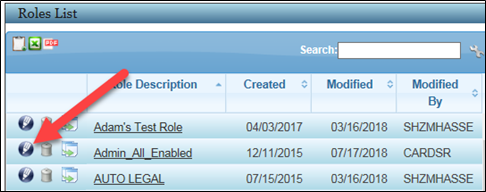
NOTE: Editing the role will change permissions for all users within the role.
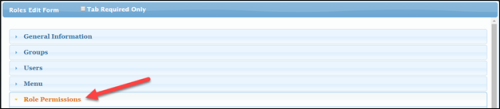
Expand the Role Permissions accordion.
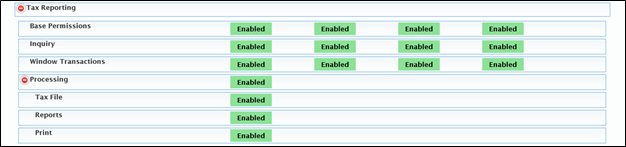
Expand the Tax Reporting record to view permission options available for the user or role. Enable all appropriate permissions for the user role.
Press Submit to save changes. The user must log out and log back in to see new permissions.
CUSTOMER INQUIRY
Permissions also need to be enabled for Tax Information within the Customer Inquiry menu to allow users to view, add, edit and delete tax records.
Select the Customer Inquiry tab within Permissions.
Enable all Tax Information options.

Press Submit to save changes. The user must log out and back in to see the new permissions.
ACCOUNT INQUIRY
Permissions also need to be enabled for Tax Information within the Deposit Account menu to allow users to view, add, edit and delete tax records.
Select the Deposit Account tab within Permissions.
Enable all Tax Information options.

Press Submit to save changes. The user must log out and back in to see new permissions.
SHAREHOLDER INQUIRY
Permissions also need to be enabled for Tax Information within the Shareholder Account menu to allow users to view, add, edit and delete tax records.
Select the Shareholder Account tab within Permissions.
Enable all Tax Information options.
Press Submit to save changes. The user must log out and back in to see new permissions.
NOTE: Tax information permissions may also be enabled at the Loan Account level.